Subscription Quick Start
Process Overview
1. Overview
Subscription: UtcPay's subscription feature allows merchants to pre-create "subscription plans" in the admin console, then generate dedicated subscription links for users via the API. After being redirected, users complete signing and authorization through their wallets. The merchant then uses the Signer to actively initiate charges at intervals defined by the plan. A callback is triggered for the merchant on each event.
Flow: 👉 Admin console create subscription plan → Merchant calls createSubscribeOrder → Build subscription page URL → User redirected to complete signing and authorization → Merchant periodically calls query chargeable subscriptions + Signer billing → Various subscription callbacks triggered → Merchant handles.
Note: API request calls require signature authentication
2. Prerequisites
-
Register a merchant account: Sandbox registration
-
Obtain API Key / Secret: Get API Key / Secret
-
Configure a callback URL (
notifyUrl) and a redirect URL (redirectionUrl) -
A subscription plan must be created in the admin console in advance (see Step 4 below)
-
Signer service must be deployed (for automatic billing, see Step 8 below)
-
Confirm the environment base URL:
- Sandbox:
https://api-sandbox.utcpay.com/api/mer - Production:
https://api.utcpay.com/api/mer
- Sandbox:
3. API Signature Authentication
All requests must include the following headers:
| Header | Description |
|---|---|
X-PAY-KEY | Merchant API Key |
X-PAY-TIMESTAMP | Current Unix timestamp in seconds (drift must be ≤ 60 s) |
X-PAY-SIGN | Signature — see "Signature Generation Rules" below |
🔹 Signature Generation Rules
Refer to the official documentation: Signature Rules
- Concatenate the string
signString = timestamp + method + requestPath + body
timestamp: Unix timestamp of the request (seconds)method: HTTP method, e.g.GET,POSTrequestPath: API path without the domain, e.g./api/mer/subscribe/payment/createbody: JSON string of the POST request body; empty string for GET requests
- Apply HMAC-SHA256
HMAC_SHA256(apiSecret, signString)
-
Base64 encode
Base64-encode the hash from the previous step to obtain the final
X-PAY-SIGN.
🔹 Request Header Example (HTTPS)
POST /api/mer/subscribe/payment/create
Host: api-sandbox.utcpay.com
Content-Type: application/json
X-PAY-KEY: <your_api_key>
X-PAY-TIMESTAMP: 1723971200
X-PAY-SIGN: <generated_signature>
🔹 Notes
- All POST requests must include
Content-Type: application/json - The
timestampmust not differ from server time by more than 60 seconds to prevent replay attacks bodymust be valid JSON, otherwise signature verification will fail
4. Create a Subscription Plan (Admin Console)
Subscription plans must be created in the admin console in advance. The plan only goes on-chain after multi-sig approval, at which point the merchant can generate subscription links.
💡 A subscription plan requires multi-sig approval before it takes effect on-chain. Make sure at least two admin accounts are available.
🔹 Step 1: Log in to the Admin Console
- Sandbox: https://adm-sandbox.utcpay.com/login
- Production: https://adm.utcpay.com/login
After logging in, confirm the current chain and wallet address in the top-right corner.
🔹 Step 2: Navigate to Subscription Plans
Top navigation: Payment Tools → Subscription Plans

🔹 Step 3: Create a Subscription Plan
Click the "Add" button, fill in the plan parameters, and click "Submit". A Signature request will appear in the wallet — verify the parameters and click Confirm to complete the first signature.
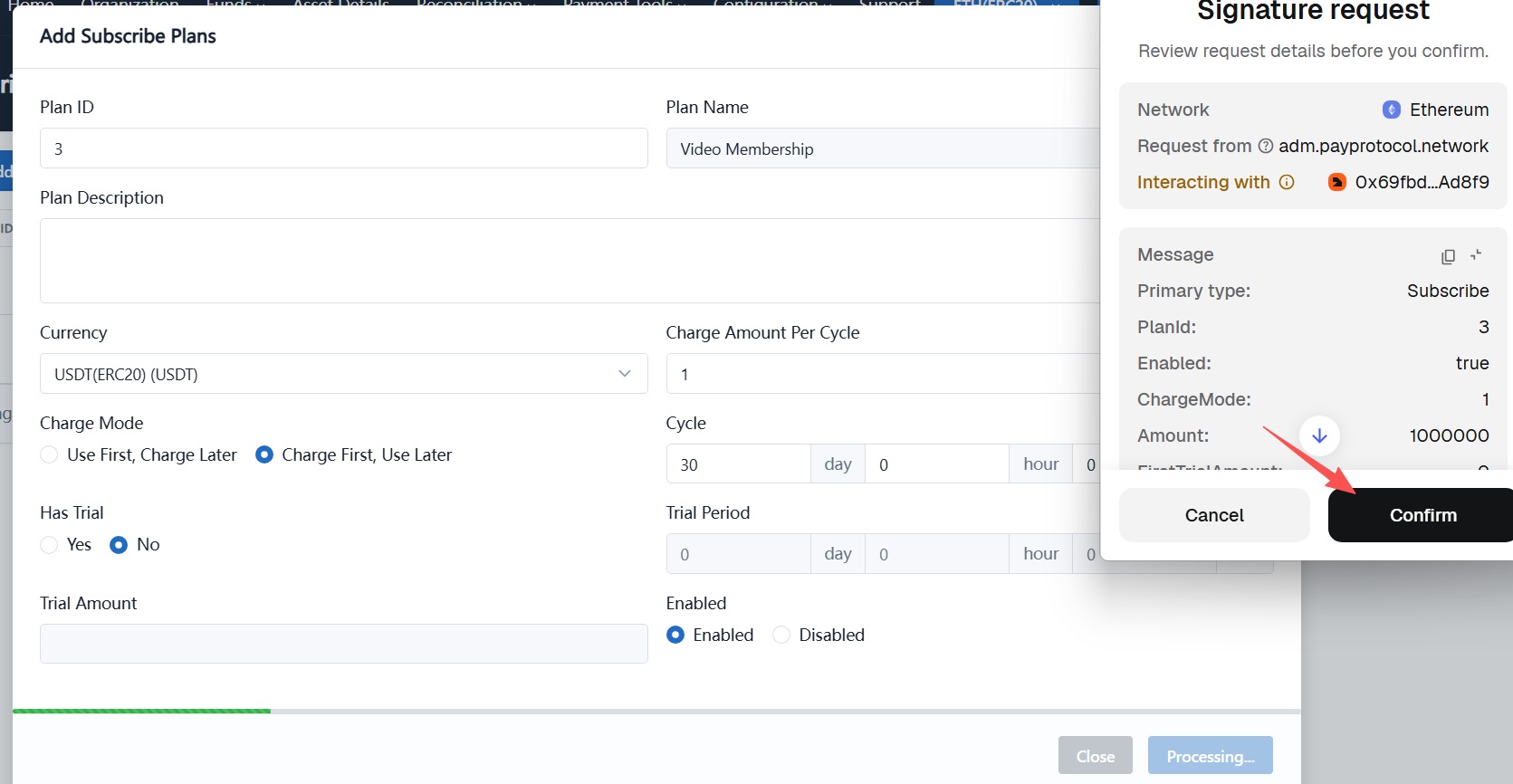
The plan ID must be filled in by the merchant. It must be unique and immutable on the merchant side (numeric IDs only). This plan ID is required for subsequent API calls.
🔹 Step 4: Multi-sig Approval
Switch to another admin account, log in to the admin console, go to Payment Tools → Subscription Plans, initiate approval for the plan, and sign again with the wallet.
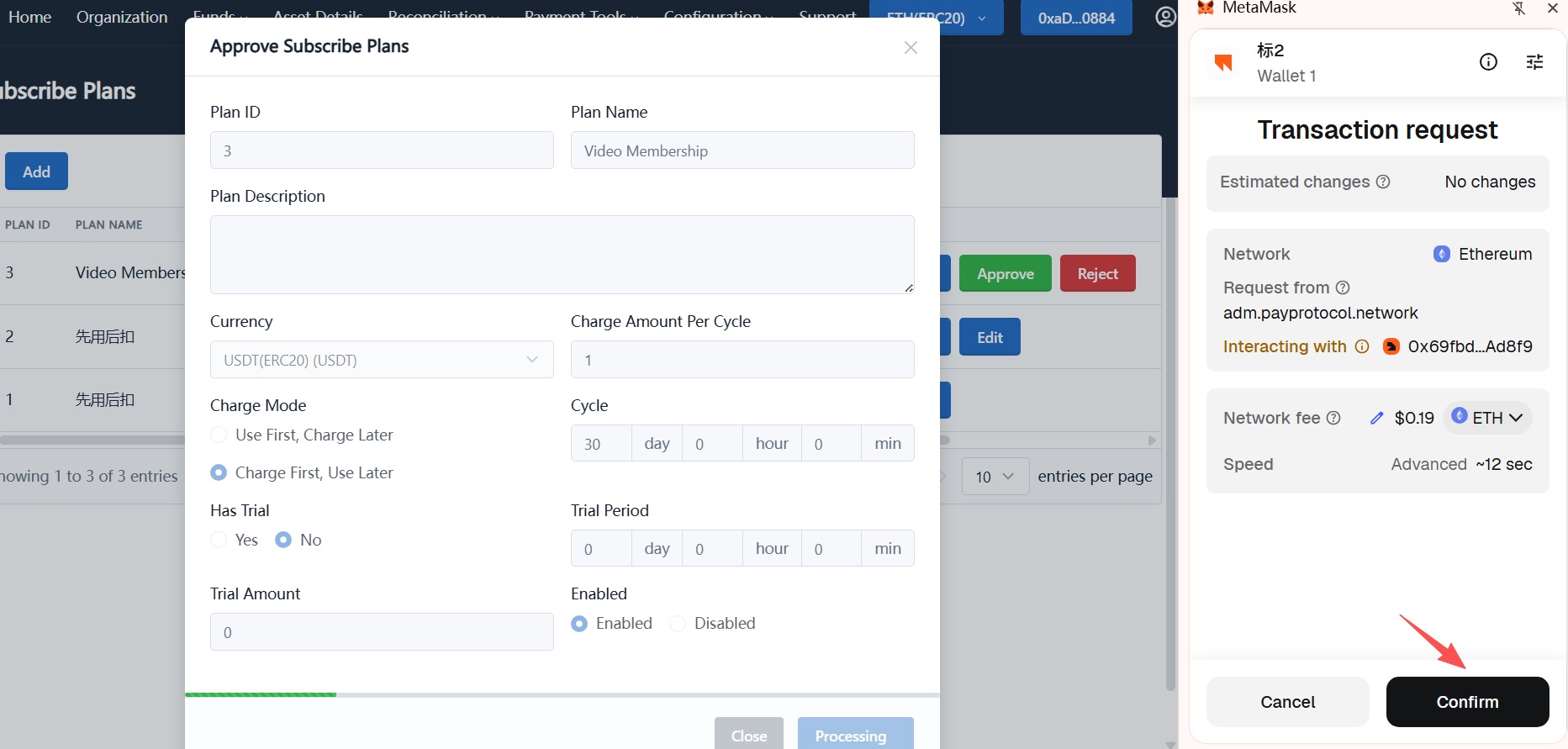
The plan parameters only take effect on-chain after multi-sig approval passes. Before approval, the plan is in a pending state and cannot be used.
🔹 Step 5: Plan Created Successfully
After multi-sig approval, the plan status changes to "Active" and can be used by the merchant to create subscription links. Record the plan ID — it is required for subsequent API calls.

5. Create a Subscription Link (createSubscribeOrder)
createSubscribeOrder API Reference
Request Body Parameters
| Parameter | Type | Required | Description |
|---|---|---|---|
chainId | int32 | Yes | Platform chain ID, obtainable from the chain list API |
planId | int64 | Yes | Subscription plan ID |
externalUserId | string | Yes | Merchant-side user identifier |
redirectionUrl | uri | Yes | URL to redirect the user to after successful subscription |
notifyUrl | uri | Yes | Merchant callback URL — must be a publicly accessible HTTPS address |
Request Example
POST /api/mer/subscribe/payment/create
Host: api-sandbox.utcpay.com
Content-Type: application/json
X-PAY-KEY: your_api_key
X-PAY-TIMESTAMP: 1723971200
X-PAY-SIGN: RlpTCwGT7lECP7achGM4oqT+Y5fXYjOqTRAJ9VPdY2U=
Request Body Example
{
  "chainId": 1,
  "planId": 3,
  "externalUserId": "USER10001",
  "redirectionUrl": "https://merchant.com/subscribe-success",
  "notifyUrl": "https://merchant.com/api/subscription-callback"
}
Response Example
{
  "code": 200,
  "msg": "success",
  "data": {
    "subscriptionId": 123,
    "paymentUrl": "/subscription?apiSign=CSetiUau5zInfAZukEGsSfelBSmlVB3XVh5t7Ozoits%3D",
    "expiration": 1723974800
  }
}
Notes:
paymentUrl→ Subscription page path — must be prepended with the official domain before usesubscriptionId→ UtcPay subscription order ID (save for later queries)expiration→ Link expiration timestamp
💡 There is no need to pre-create a sub-contract address for users before subscribing. Users simply connect their wallet on the subscription page to complete signing.
externalUserIdserves only as the merchant-side user identifier.
🔹 Build the Subscription Page URL
The returned paymentUrl is a relative path. It must be prepended with the UtcPay official domain:
- Production:
https://payment.utcpay.com+paymentUrl - Sandbox:
https://payment-sandbox.utcpay.com+paymentUrl
Example:
https://payment.utcpay.com/subscription?apiSign=CSetiUau5zInfAZukEGsSfelBSmlVB3XVh5t7Ozoits%3D
Never use the raw paymentUrl returned by the API directly. Always prepend the official domain to avoid misuse or security risks.
🔹 Integrate into the Merchant Platform
Add the assembled URL to your subscription platform — for example, a "Pay with USDT" button:
<a href="https://payment.utcpay.com/subscription?apiSign=...">
  Pay with USDT
</a>
When the user clicks the button, they are redirected to the UtcPay subscription page to complete the confirm plan → sign agreement → authorize allowance three-step flow.
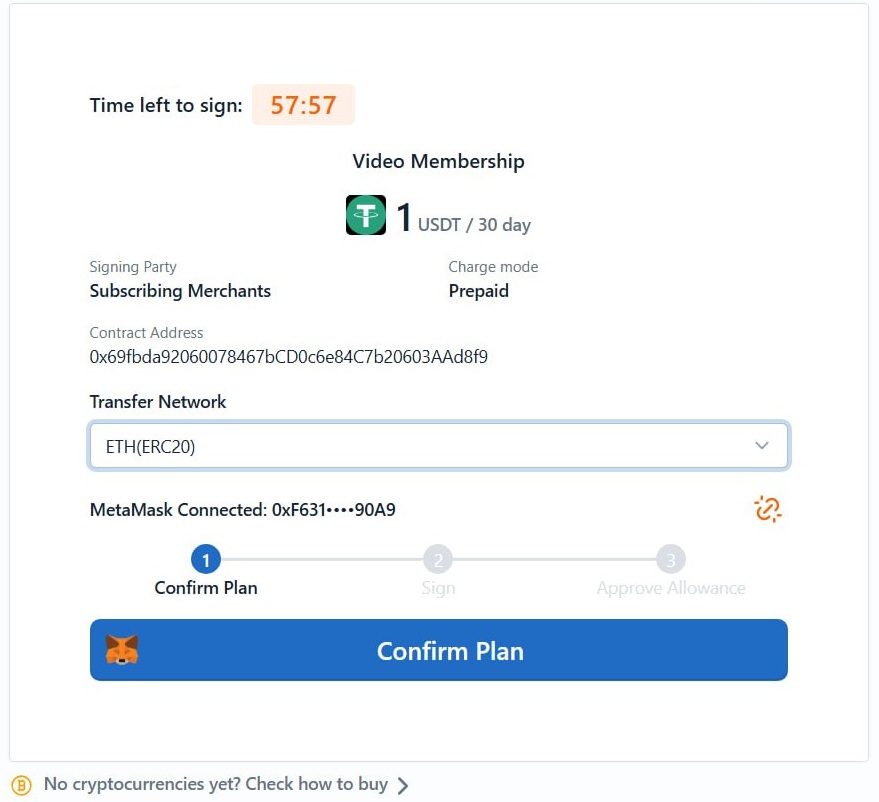
💡 In the sandbox environment, you can claim test tokens to simulate subscription transactions:
- Follow the Test Token Faucet Guide.
- Based on the selected chain (Tron Nile or Ethereum Sepolia), open the corresponding official faucet website.
- Enter your test wallet address and claim test tokens (USDT, ETH, TRX, etc.).
- Use the claimed test tokens to subscribe via the generated
paymentUrland complete the subscription flow test.
Note: All testnet tokens are only valid in the sandbox environment and have no real value.
Note: Testnets and mainnets are completely independent blockchain networks. Never send mainnet assets to a testnet address, or vice versa.
6. Subscription Callback (subscriptionCallback)
subscriptionCallback API Reference
UtcPay asynchronously POSTs to notifyUrl. Upon receiving a callback, the merchant must:
- Verify that the
signsignature is valid - Handle the corresponding business logic based on
subscriptionType - Return HTTP 200 with the body
successto acknowledge receipt
🔹 Callback Types
Use the subscriptionType field to distinguish callback types:
| subscriptionType | Trigger | Recommended Merchant Action |
|---|---|---|
SubscriptionRegister | User completes signing on the subscription page | Record subscription relationship, mark user as signed |
SubscriptionApprove | User completes wallet authorization | Mark authorization status, subscription becomes active |
SubscriptionBilling | Each periodic deduction completes (incl. first) | Update subscription validity period, grant entitlements |
SubscriptionCancel | User actively unsubscribes | Mark subscription as cancelled, stop further services |
🔹 Callback Example
{
  "subscriptionType": "SubscriptionBilling",
  "outTradeNo": "SUB202508191519455758358",
  "externalUserId": "USER10001",
  "planId": 3,
  "planVersion": 1,
  "chainId": 1,
  "userWallet": "0xF631...90A9",
  "amount": "1000000",
  "currencySymbol": "USDT",
  "transferHash": "0x928b3243...",
  "blockTime": 1712122830,
  "createTime": "2025-08-19 15:19:45"
}
🔹 Retry Policy
Callbacks are sent up to 6 times after the event is confirmed, at intervals of 0 s, 15 s, 30 s, 3 min, 5 min, and 10 min.
Once the merchant returns success, the system considers the callback successful and stops further retries.
📌 Merchants must verify the signature of the callback notification. The signing method is the same as for regular API requests.
7. Automatic Billing Flow
After the subscription is created and the user has completed authorization, the merchant must actively invoke the billing flow to trigger periodic charges. The overall flow consists of two steps: query chargeable subscriptions → call the Signer to bill. The Signer automatically broadcasts the transaction on-chain; no manual handling is required from the merchant.
💡 The call frequency is up to the merchant and should be triggered according to actual business needs (e.g. hourly or daily scheduled tasks).
🔹 Flow Overview
Merchant scheduled task
↓
1. getChargeableSubscriptionList — query chargeable subscriptions
↓
2. signProcessSubscribePlan — call Signer for billing (EVM or TVM depending on chain)
↓
Success → Signer auto-broadcasts on-chain → SubscriptionBilling callback (success)
Failure → Returns failure reason → SubscriptionBilling callback (failure)
🔹 Query Chargeable Subscription List
getChargeableSubscriptionList API Reference
The merchant calls this interface on a schedule to retrieve the list of subscriptions due for billing.
GET /api/mer/subscribe/chargeable/list?page=1&size=20
Host: api-sandbox.utcpay.com
X-PAY-KEY: your_api_key
X-PAY-TIMESTAMP: 1723971200
X-PAY-SIGN: <generated_signature>
Each subscription in the returned list contains subscribeId and the necessary on-chain information, which serve as inputs for the next Signer call.
🔹 Call the Signer for Billing
The Signer interface to call differs by chain:
- EVM chains (ETH):
POST /PayTool/EVM/subscribe/signProcessSubscribePlan - TVM chains (TRON):
POST /PayTool/TVM/subscribe/signProcessSubscribePlan
API References:
Pass the queried chargeable subscription data to the Signer. The Signer will complete the sign + auto-broadcast flow entirely.
🔹 Billing Response Details
✅ Billing Successful (code = 1)
{
  "code": 1,
  "msg": "SUCCESS",
  "data": {
    "address": "0xf0d2db2740ca0cd94e76c1af85fc9e5ef88ee011",
    "chainId": 139,
    "gasRequired": "117803",
    "signedTransactionData": "0xf8cc3983e441a88301cc2b943e8d3c579817fa235901096c64107c8c8867554f80b86452429e7f...",
    "subscriptionIds": [49],
    "txHash": "0xe222a81f39b38cc50a14a3539086066bcf4d0a2582dc5a81abab27ef158f4ed9"
  },
  "description": null
}
Field descriptions:
signedTransactionData→ Signed transaction data (the Signer broadcasts it automatically; no merchant action needed)subscriptionIds→ List of subscription IDs covered by this billingtxHash→ On-chain transaction hash (useful for tracking and reconciliation)gasRequired→ Gas consumed by this transaction
After a successful billing, simply wait for UtcPay to trigger the SubscriptionBilling callback.
❌ Billing Failed (code = 2)
{
  "code": 2,
  "msg": "SUCCESS",
  "data": [
    {
      "amount": 8000000,
      "failReason": "Allowance insufficient",
      "planId": 6,
      "subscribeId": 44,
      "tokenAllowance": "0",
      "tokenBalance": "944000000",
      "userHash": "0xde1469a7d688f10c46f3a25f12c23bce48dfc52f999031664cca22df931a4382"
    }
  ],
  "description": null
}
The response array lists each subscription that could not be charged along with the specific reason. Common failReason values:
| failReason | Description | Recommended Merchant Action |
|---|---|---|
Allowance insufficient | User's authorized allowance is low | Guide user to re-authorize or unsubscribe |
Balance insufficient | User's wallet balance is too low | Notify user to top up or suspend the service |
Regardless of success or failure, UtcPay will send a subscriptionType=SubscriptionBilling callback to the merchant's notifyUrl. Merchants must use this to update subscription status, grant services, or stop entitlements. See Section 6 above for callback handling logic.
8. Deploy the Signer
Signer Deployment Documentation
The Signer is a service for securely managing private keys and signing on-chain transactions. It is deployed and operated by the merchant. Automatic subscription billing depends on the Signer to complete signing and broadcasting.
The Signer must be fully deployed and running before the billing flow is invoked.
Once deployed, the Signer exposes HTTP interfaces for the merchant to call:
- Sign EVM subscription billing:
POST /PayTool/EVM/subscribe/signProcessSubscribePlan - Sign TVM subscription billing:
POST /PayTool/TVM/subscribe/signProcessSubscribePlan
For the full list of Signer interfaces, see: Signer API Reference
9. Create an Unsubscription Link (createUnsubscribeOrder)
createUnsubscribeOrder API Reference
Request Body Parameters
| Parameter | Type | Required | Description |
|---|---|---|---|
outTradeNo | string | Yes | UtcPay subscription order ID |
redirectionUrl | uri | Yes | URL to redirect the user to after successful unsubscription |
notifyUrl | uri | Yes | Merchant callback URL — must be a publicly accessible HTTPS address |
Request Example
POST /api/mer/subscribe/cancel/create
Host: api-sandbox.utcpay.com
Content-Type: application/json
X-PAY-KEY: your_api_key
X-PAY-TIMESTAMP: 1723971200
X-PAY-SIGN: <generated_signature>
Request Body Example
{
  "outTradeNo": "SUB202508191519455758358",
  "redirectionUrl": "https://merchant.com/unsubscribe-success",
  "notifyUrl": "https://merchant.com/api/subscription-callback"
}
Response Example
{
  "code": 200,
  "msg": "success",
  "data": {
    "paymentUrl": "/unsubscription?apiSign=...",
    "expiration": 1723974800
  }
}
The URL assembly rules for unsubscription links are the same as for subscription links:
- Production:
https://payment.utcpay.com+paymentUrl - Sandbox:
https://payment-sandbox.utcpay.com+paymentUrl
Provide the assembled URL to the user (e.g. a "Cancel Subscription" button on the merchant's subscription management page). The user is redirected to cancel their wallet authorization and complete unsubscription.
After unsubscription, the merchant will receive a subscriptionType=SubscriptionCancel callback notification.
10. Query Subscription Information
✅ You have now completed the full subscription integration flow: